Xbox Cloud Gaming has emerged as one of the most modern innovations in gaming, allowing players to have console-quality experiences without a physical Xbox console. Rather than downloading, or installing games — everything runs on massive remote servers and streamed instantly to your device. It also allows for more portability, lower cost and greater accessibility than ever before in gaming.
It is a comprehensive guide on how xbox cloud gaming works, its features, supported devices, game library, internet requirements along with its pros and cons and future potential.
What is Xbox Cloud Gaming?
xbox cloud gaming (formerly known as Project xCloud) is a video game-cloud streaming service created by Microsoft. It allows people to play Xbox video games directly through the internet. Assuming local hardware is not a console or gaming pc; the game runs on a remote server and streamed to you device live.
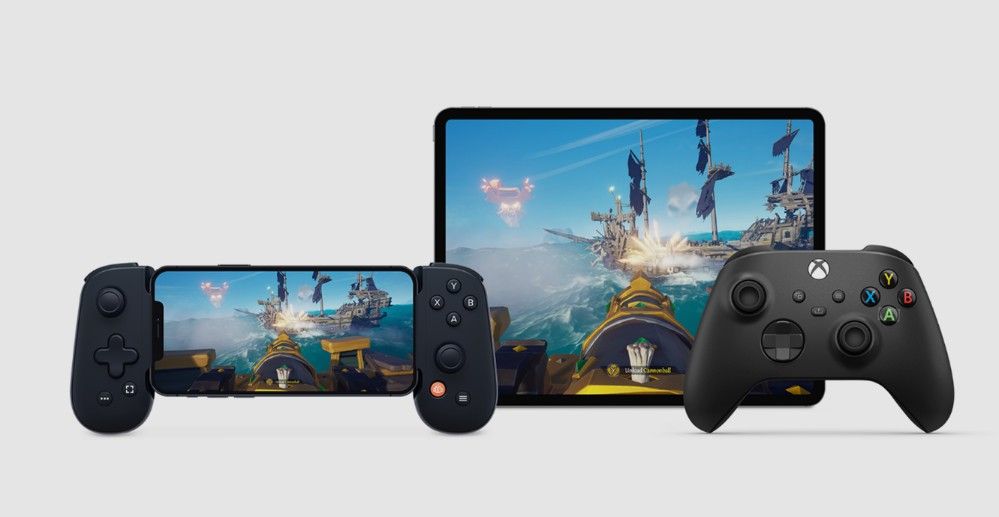
That means users are able to enjoy premium games on:
- Smartphones
- Tablets
- Laptops
- Smart TVs
- Low-end PCs
You only need a reliable internet connection and the right device.
How Xbox Cloud Gaming Works
At this point, you should have a decent idea of how xbox cloud gaming works intrinsically: it is heavily based on remote server computation and real-time streaming technology
Step-by-Step Process
- The game operates offa beefy ol’ Xbox server
- The video output is stream fed to your device
- Your inputs (controller or touch) relay back in real time
- The gameplay is updated in real time by the server
Which essentially simulates the experience of console gaming without any console ownership.
Supported Devices
The best part about xbox cloud gaming is that, even a particular device works with it.
| Device Type | Support |
|---|---|
| Android Phones | Fully supported |
| iPhone/iPad | Supported via browser |
| Windows PC | Supported via app/browser |
| MacBooks | Supported via browser |
| Smart TVs | Supported on select models |
| Xbox Consoles | Cloud play supported |
It can be played anywhere and at any time thanks to this flexibility.
Features of Xbox Cloud Gaming
Its many advanced features enhance the gaming experience.
Instant Game Access
Simple — no downloads or installations needed. Games start instantly.
Cross-Device Play
Users can hop from one device to another and still have progress saved.
Controller Support
The support for the Xbox controllers and several Bluetooth gamepads is built.
Touch Controls
Ordinarily, there are inner mobile touch controls for a few video games.
Game Library Access
The subscribers have hundreds of games ranging through diverse genres available.
Xbox Cloud Gaming game library
The xbox cloud gaming library is broad, spanning various genres with many popular titles.
Game Categories
| Genre | Description |
|---|---|
| Action | Shooting and combat games |
| Adventure | Story-driven exploration games |
| Sports | Football, racing, and simulation |
| RPG | Role-playing open-world games |
| Multiplayer | Online competitive games |
New games are added periodically to keep the library fresh and lively.
Internet Requirements
To play the game you need to be connected to a strong internet connection on xbox cloud gaming.
| Quality Level | Minimum Speed |
|---|---|
| Basic Play | 10 Mbps |
| Recommended | 20–50 Mbps |
| Best Experience | 50+ Mbps |
It is recommended to use a 5G Wi-Fi or 5G mobile connection for the best results.
Subscription Requirement
Plus have to pay for a subscription to Microsoft’s premium service to access xbox cloud gaming.
Benefits of Subscription
- Cloud gaming access
- Large game library
- Xbox console games included
- PC gaming access
- Online multiplayer support
This subscription helps keep it affordable for many gamers who do not possess high-end hardware.
Advantages of Xbox Gaming
There are certain advantages here that have made xbox cloud gaming loved globally.
No Console Needed
Allows users the ability to play even the most demanding games without the need for a console purchase.
Portable Gaming
With the provision of an internet connection, you can play games anywhere.
Low Cost Entry
You wont need any costly gaming apparatus upgrades.
Instant Access
No downloads, no waiting for updates.
Device Flexibility
Works across multiple platforms seamlessly.
Limitations of Xbox Gaming
While there are some advantages, xbox cloud gaming also has its share of disadvantages.
Internet Dependency
It requires having stable and fast internet at all times.
Input Delay
There will likely be a tiny bit of lag with some games
No Offline Mode
Games cannot be played without the internet to play.
Regional Availability
That makes — overall —Complete Unavailable In All Countries
What is Cloud Gaming and how does it differ from Traditional gaming
| Feature | Cloud Gaming | Console Gaming |
|---|---|---|
| Hardware Needed | Not required | Required |
| Installation | Not needed | Required |
| Mobility | Very high | Limited |
| Performance | Internet-based | Hardware-based |
| Cost | Subscription | High upfront cost |
The Best Games on Xbox Gaming
Here are some of the most popular titles available:
- Action adventure games
- Open-world RPGs
- Racing simulations
- Multiplayer shooters
- Sports games
They run perfectly on xbox cloud gaming and are enjoyable to play when conditions with the internet are good.
Tips for Better Experience
This post you will see: How To Get The Most Out Of Xbox Gaming
- Use a strong Wi-Fi connection
- Avoid background downloads
- Better control over a controller
- Close unnecessary apps
- Use 5GHz Wi-Fi when possible
This process will reduce the delay and make actions more responsive.
Future of Xbox Gaming
Considering how cloud services are progressing, its safe to say that the future of xbox cloud gaming is quite bright. Microsoft is adding more server capacity, and improving the quality of the stream, to lower latency and increase resolution.
Cloud gaming in the next few years might be the main way that people play video games, and it could eliminate the need for physical consoles altogether.
Conclusion
This is a repetitive cycle, but Xbox cloud gaming builds the foundation with accessibility, affordability and flexibility. No expensive hardware, and have console light experiences on almost any device.
It is heavily reliant on internet quality, but its ease of use, expanding game library and cross-device compatibility position it as one of the greatest advancements in modern gaming.
With the last few months being so interesting for technology, you can bet that Xbox Gaming will be a big part of interactive entertainment as ever in years to come.
PlayBattleSquare Exploring Paris After Dark: The Ultimate Night Travel Guide to the City of Light
About the Author